 Aevia
Aevia
Expanding life cycle assessment and thinking through generative AI
Aevia is an assistant for life cycle assessment. It searches the LCA literature and LCA databases, builds LCA models — product systems — and runs impact assessments on them. Its interface is made for interrogating what comes back, so you arrive at the meaning rather than at a column of numbers.
It works alongside the software you already use: connect your own openLCA, or plug Aevia into your Claude, ChatGPT or other assistant account and drive it from there.
New accounts start on the Demo plan. For your first month, Demo also switches on everything the Base plan and both add-ons add*. Chat usage is pay as you go, but you start with a gift of 300 usage credits. Demo also gives permanent access to a free demo LCA database and the read-only MCP Connector, which lets you search Aevia from Claude, ChatGPT and other AI assistants.
* On Demo's own usage limits and assistant models, which the month does not change: the premium models and the weekly allowance of usage credits are the Base plan's, alongside its higher usage limits. After the first month those capabilities switch off and you carry on with Demo, and whatever you made with them stays yours and stays usable.
Help me compare the environmental impacts of three different types of typical swiss houses. First search the web for information about these, then search the literature, then model the houses, then assess their impacts, and then compare them and state your conclusions.
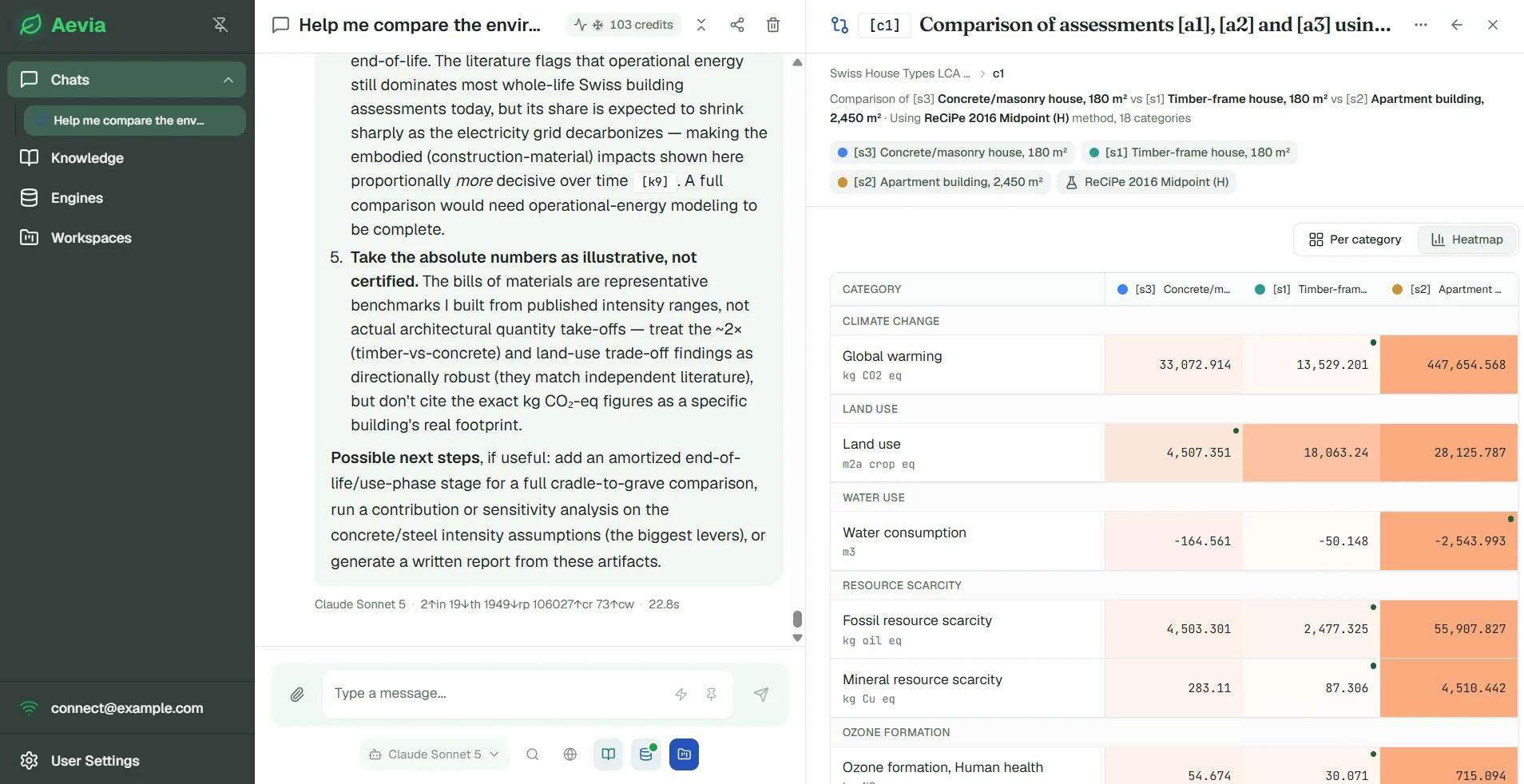
Aevia searches the web, the literature, and the demo database. It then builds three product systems to represent the three houses (timber, masonry, and concrete houses), runs impact assessments on each, shows the results in a heatmap graph, interprets the results, and proposes next steps. All generated artifacts are saved into your workspace.
How it works
From a question to something you understand.
It follows the shape an assessment already has — find the data, model the system, run the numbers, work out what they mean — without forcing you down a compliance workflow. Aevia is as useful for an exploratory comparison or a sanity check as it is for the modelling behind a full ISO 14040 study.
Search the literature and your databases
Ask in plain language. Aevia searches a library of over 130,000 peer-reviewed articles for the measured values, methods and context behind a model — applied sustainability research, from energy and food to materials, waste and policy, with LCA one field among many. For data, it searches the processes in your database: thousands of datasets, in the descriptors they were published under.
Build product systems to model what you want to investigate
State the functional unit and the system boundary; Aevia assembles the product system, from a bill of quantities or as an explicit network of linked unit processes. You see the model before anything is calculated, and you can edit it — add a member, rewire a link, change an amount — with the same validation either way.
Assess the environmental impacts of your models
A full LCIA on a real engine: classification and characterisation across every category the chosen method defines, using the characterisation factors the engine resolves rather than the ones stored in the method definition — so unit conversion, regionalisation and direction sign are the engine's, not a reconstruction of them.
Gain understanding
The phase that decides whether an assessment is worth anything. Contribution analysis by member or by elementary flow, sensitivity on any driver or parameter, comparison across product systems — then a Word report carrying the goal and scope, the method, the data provenance and the figures.
Knowledge base
Half of an assessment is an argument from the literature.
Allocation choices, method selection, the defensibility of a proxy dataset — these get settled in papers and standards, not in a database column. Aevia searches a curated library semantically, returns the passage rather than the whole document, and cites what it used, so a sentence in your report can be traced back to a page.
- Search is on every plan, including the Demo plan.
- Live web search and page fetch, for the guidance note that is in no library yet.
- On the Base plan, add your own library — PCRs, client reports, internal method notes — searchable alongside the rest and private to you.
The library currently indexes four journals:
- The International Journal of Life Cycle Assessment
- Journal of Cleaner Production
- Journal of Industrial Ecology
- Sustainability
Only what we are entitled to read. Aevia indexes abstracts and bibliographic records across all of these journals, and full text only for open-access articles. Everything else is searchable by its abstract and citation, and links out to the publisher for the rest — so the assistant can point you to a paper it may not quote, which is the honest version of a literature search.
Software stack connectors
Aevia plugs into the tools you already pay for.
It is an interface and an orchestrator, not another silo.
openLCA Connector
Through the openLCA Connector, Aevia connects to the openLCA instance running on your computer, and can access and work with any commercial database you are licensed for. A small program opens a private tunnel from your openLCA to Aevia, and the assistant browses and calculates through it: a solve there runs on your hardware, and because it is your CPU under your licence, we never meter it.
The datasets stay in your openLCA. What Aevia keeps is the shape of your work — which unit processes a system links to, by identifier, and the results you calculated. The inventory behind those identifiers is read from your engine each time it is needed rather than copied into ours, so there is no licensed database here for us to host or redistribute, and your licence stays between you and your licensor.
The openLCA Connector is a $7 add-on to the Base plan, plus tax, and is free for your first month. It needs openLCA running on your computer with its IPC server switched on, and the free Aevia Tunnel Connector app for Windows, from the Microsoft Store.
MCP Connector
Aevia's tools are exposed over the Model Context Protocol (MCP), so you can drive them directly from Claude, ChatGPT or any other MCP-capable assistant account. That makes Aevia easy to integrate with third-party tools, and it spends your AI assistant provider's credits rather than Aevia's usage credits — usually at a cheaper rate, and more convenient if you want the premium tier of large language models. The read-only MCP Connector, on every plan including Demo, exposes read-only tools for searching LCA databases and the literature library. The full MCP Connector add-on (see below) exposes the whole toolset, for building complex product systems and running advanced impact assessments and analyses.
Every artifact you build using the full MCP Connector is saved in a workspace in your Aevia account. By pointing to the same workspace, multiple chats and MCP Connector sessions can work over a shared collection of systems, assessments, visualizations and reports.
How to connect Aevia to Claude, ChatGPT and other assistants
The read-only MCP Connector, included on Demo and every other plan, lets third-party AI assistants use Aevia's read-only tools. The full MCP Connector gives them the whole toolset. It is a $7 add-on to the Base plan, plus tax, and is free for your first month.
Traceability
Every number remembers where it came from.
The hard question about an assessment is never asked on the day you finish it. It comes six months later, from a client or a reviewer, and it is always some version of why is this figure what it is?
So nothing here is overwritten. Every product system is versioned and immutable: editing writes a new version, and an assessment stays pinned to the exact version it was calculated from. The chain from a figure in your report back to the model, the method and the datasets behind it stays intact.
- One name for one thing. A product system is s1, its assessment a2 — the same handle in every conversation and everywhere in the interface, so you and the assistant are never discussing two different objects by the same name.
- Change announces itself. Edit a system and every assessment computed from the previous version is flagged as out of date — instead of quietly becoming wrong while still looking finished.
- Drift is detected, not guessed. If the copy in your openLCA moves out of step with the copy here, Aevia says so and offers you the resolutions rather than silently choosing one.
- Even the assistant is accounted for. Each conversation reports the usage credits it spent, down to the individual tool call — alongside the energy and water its own model usage consumed.
Multilanguage support
LCA does not only happen in English.
Ask in Spanish, Portuguese, German or French and the whole conversation follows you there — the reasoning, the explanation of a method choice, the prose of a report. The one thing that stays put is the data: a process descriptor keeps the exact wording its database published, in the language it published it, because a translated descriptor is no longer traceable to the dataset it names.
Plans
A free Demo plan and a Base plan to build on.
Evaluate Aevia on the free Demo plan, and move to the Base plan when it becomes part of how you deliver work.
No card needed.
300 usage credits to start, granted once
See what Aevia does, on a curated public database. For trying it properly, teaching, and studying.
Sign in- Full LCA tooling on the BAFU Swiss database
- Product systems from a bill of quantities, assessed and compared
- Contribution and sensitivity analysis
- Literature search and web search
- The read-only MCP Connector — search it all from Claude, ChatGPT or another assistant
- Versioned workspaces — 10 workspaces, 50 chats
- Everything the Base plan and both add-ons add, free for your first month — on the usage limits above, and on the Demo plan’s assistant models, neither of which the month lifts
- After the first month: what the Base plan and the add-ons add switches off — Demo stays, and so does the work you made with them
- The premium assistant tier and the weekly credit allowance — the Base plan only, and the first month does not lend them
A gift, not a monthly allowance — enough to evaluate this properly rather than enough to get a taste, and yours to spend at whatever pace suits.
Plus tax.
100 usage credits a week included, renewing
The whole modelling environment, on the engine and database we host. For delivering work.
Sign in- Linked product systems — model an explicit network of unit processes, not just a bill of quantities
- Word (.docx) reports
- Upload your own documents into the knowledge base
- Unlimited workspaces, chats and saved objects
- Every assistant model, including the premium tier
- Full LCA tooling on the same hosted BAFU Swiss database, with literature and web search, and the read-only MCP Connector
- The openLCA Connector — an add-on
- The full MCP Connector — an add-on
Billed monthly, cancel any time. Past the weekly allowance, credits come from a wallet you top up yourself — always pre-paid, never automatic.
Introductory pricing. These are launch prices while Aevia is new. If they go up, you keep the one you signed up at for at least a year — and we’ll tell you before anything changes.
Add-ons
Add-ons
Add-ons require the Base plan and are billed alongside it. You can add one, both, or neither. It all depends on whether you have a use for them or not. Each is a powerful connector that enables Aevia to work as an interface to established LCA and AI software.
Plus tax.
Point Aevia at the openLCA and the data licences you already own. Solves against your own engine then run on your hardware under your licence, and we never meter those.
Plus tax.
The full MCP Connector: Aevia’s whole toolset from Claude, ChatGPT or another MCP client, to build product systems and run assessments. On the assistant subscription you already pay for — so the conversation itself spends none of your usage credits.
Whichever you carry, the account is the same one: every account starts on the Demo plan, and moving to the Base plan — or adding or dropping an add-on — is a switch in your billing settings that adds capabilities rather than replacing them, at any time and without losing any work. Every price here is a subtotal: Paddle adds the tax for your country at checkout and itemises it before your card is taken.
Q&A
Questions & Answers
Do I need openLCA to use this?
Not to start. The Demo plan runs against a curated public database that we host, so you can build systems and run real assessments without installing anything. Connecting your own openLCA is the openLCA Connector add-on, and your first month switches it on, so you can point Aevia at your own engine and data before deciding whether it is worth paying for.
Can I use ecoinvent?
If you hold an ecoinvent licence and have it open in your openLCA, Aevia works against it the same way it works against any other database — the tunnel forwards requests to your own engine and does not care which data is loaded. We do not supply, host or redistribute ecoinvent today, and your licence terms with them continue to govern your use of the data. An add-on with a commercial database hosted by us is the obvious next one, and the product is built for it — but it has no price and no date, and there is nothing to buy until the licence terms are settled.
Can my team work on the same assessments?
Not yet — an account is one person today, and everything you build lives in your workspaces. Shared workspaces and version-controlled product systems, with the kind of history a modeller expects when several people edit the same system, are what we are building toward; openLCA's own collaboration server is the natural way in. We would rather show you that working than put a date on it.
What can you see of my data?
Calculations on your own engine run on your machine. What Aevia stores, in your own workspace, is the systems and assessments you save — process identifiers, the link structure between them, the names needed to display them, and the numbers your calculations produced. It does not pull the underlying datasets out of your database, and nothing in your workspace is shared with other users or sold to anyone.
Is this a compliance or EPD tool?
No, and deliberately not. Aevia is an assistant for someone who knows what they are doing — it does not issue verified declarations, it is not a certification pipeline, and it does not replace a critical review. It is built to make an expert faster and better-sourced, and you remain the author of the assessment.
Which assistant models does it use?
Several, from several providers, routed per task — a cheap model for routine work and a stronger one where it matters. The Base plan includes the premium tier; the Demo plan runs on the economy and standard ones, and the first month does not change that. We publish what each conversation cost, so the routing is visible rather than something you have to trust.
What is a usage credit?
The unit your assistant usage is metered in — the model tokens, the searches, the embeddings behind a conversation. How far a credit goes depends on which model you put to work, which is why every conversation reports what it spent.
Where do usage credits come from?
A paid plan includes an allowance that renews every week. Past it, credits come from a wallet you top up yourself, and that wallet is strictly pre-paid — no overage billing, no automatic top-up, so a month can never end with you owing money you did not choose to spend.
What happens when I run out of usage credits?
The assistant pauses and everything else keeps working: your workspaces, product systems, assessments and reports stay open and readable, and you can still export them. You top up to start chatting again. Nothing is ever charged automatically.
Are the free usage credits a trial that expires?
No. They are granted once when you verify your email, and there is no countdown — no fourteen-day clock, and no card to cancel before. When they are spent, you decide whether to top up. The month of paid capabilities that comes with them is a separate thing and does end: after thirty days you carry on with the Demo plan, keeping your work, your remaining usage credits and the read-only MCP Connector, and everything the Base plan and its add-ons add switches off.
Why meter usage at all?
Because a conversation with a capable model has a real cost, and it varies enormously with what you ask for. Metering it is what lets the Demo plan be genuinely useful instead of tightly rationed, and it means you can see exactly what a piece of work cost you rather than guessing against an opaque quota.
What does a top-up cost?
A thousand usage credits is $14.00, plus tax. The checkout shows the tax for your country and the total before your card is taken, and nothing is ever charged automatically.
Can I cancel?
Any time, and your work stays yours to read and export. A subscription runs to the end of the period you have paid for and does not renew after that. See the refund policy for how part-months and unused credits are handled.
Who takes the payment?
Paddle, acting as merchant of record. Card details never reach us — we receive a transaction reference and your subscription status, and your statement will show Paddle rather than Aevia.